Build your own export filters
Filter exports by any product field, pick several values at once, and mix "and" with "or". Or describe the products in your own words and the filters are set for you.
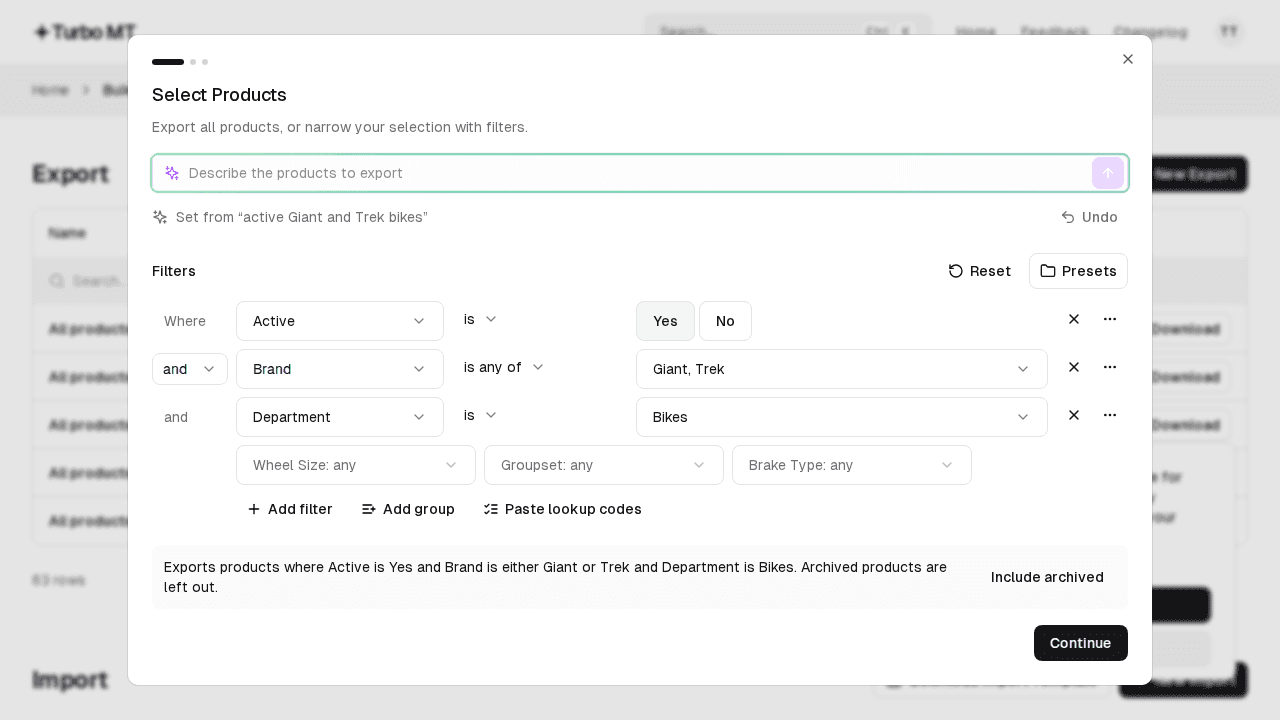
In Bulk Import & Export, choose New Export, then Add filter. Pick any field, such as Brand, Item Group, Season, Colour or Lookup Code, and a condition like "is any of" or "contains".
Prefer to type? Describe what you want, like "active Giant and Trek bikes" or "lookup codes containing 1234 or 5678". The filters are set for you, anything that can't be filtered is listed, and Undo puts things back.
Save filters you use often as a preset, paste a list of lookup codes, or include archived products from the summary.
Recent updates
View all Faster Bulk Import & Export, with undo
We've made a number of improvements to Bulk Import & Export. You can now undo an import, fix common mistakes without re-importing your file, and imports are up to three times faster.
- Improved Quick Search
Open Quick Search from the header or with Cmd/Ctrl+K to jump straight to any app, page, product or job.
 Export products by lookup code
Paste a list of lookup codes into the new Lookup Codes filter, verify it, and export just those products.
Update thousands of products in minutes
Bulk update your Cloud MT products using the Excel and CSV files you already have.
Start a 14-day free trial


2,500+ bulk imports completed